现在,我们可以通过CSS3特效来实现悬停弹出效果。这是一个有趣的事情,让我们放弃了更多的JS。但是,很多时候我们都忘记了CSS2.1给我们带来的美好效果。因为它具有非常好的浏览器支持,我们可以做很多特效以便兼容目前所有主流浏览器。
在本教程中,我们将会利用CSS2.1属性创建灵活先进的悬停特效。
其实教程很简单:
The WordPress Toolbox
Unlimited Downloads: 500,000+ WordPress Themes, Plugins, Templates & Design Assets

当我们初学css的时候,我们知道“:hover”元素只限于去除链接的下划线而已。
但现在、通过下面的例子,我们会学到其中最有魅力的一种属性,通过它,我们可以实现更多更酷的特效。
一个很cool的特效就是创建图像的顶部显示标题文本,为用户创造一些好的视觉反馈,当鼠标滑动到图像时显示一些有关图像的信息。
精明的读者会发现这项技术具有巨大的潜力,当鼠标悬停在超链接时,如显示CSS工具提示。
我们会使用这些关键的CSS属性,伪类,并伪元素来完成我们的特效:
1、创建内容代码:
CSS代码允许我们追加(:after)或是预加(:before)内容。用于动态内容及静态内容(attr()),图像(url())和计数内容(counter())属性。
在下面的例子里,我们将使用(attr())函数来标记提取显示内容的<a>标签。
ul a:hover:after
{
    content: attr(title);
}

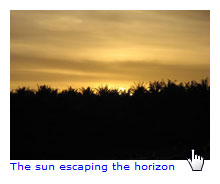
从上面可以看到,使用content属性允许我们把“title”追加到内容之后。
2、美化让其更好看:
现在,我们要做就是调整hover/focus的在图像后面的位置,用CSS来实现让他浮于图像上方。
首先,我们需要创建一个list容器。主要用来确定相对位置,并允许在这个list容器插入绝对位置的单元。
下面只代码:
ul > li {
    position: relative;
    float: left;
    list-style: none;
    margin: 0 20px 20px 0;
    font-size: 10px;
}
添加更多样式到(:hover),我们用CSS来定义绝对位置并给予它高度、背景,行间距(这个与高度相同,所以我们定义将文本垂直居中)。
我们还可以同样来定义(:focus),不通过鼠标也能获得更好体验。
ul a:hover:after,
ul a:focus:after
{
    background: rgb(255,255,255);
    bottom: 2px;
    content: attr(title);
    color: #000;
    display: block;
    font-weight: bold;
    height: 30px;
    line-height: 30px;
    position: absolute;
    text-align: center;
    width: 100%;
}
我们还可以通过添加(outline)属性来给图像创建一个边框特效。
为什么我们不用(border)属性是因为(outline)不会影响相关对象,而(border)则会影响。
ul a:hover img, ul a:focus img { outline: 3px solid #ccc; }
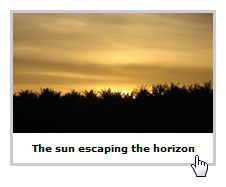
我们现在有一个简单而有效的字幕叠加,用一些简单的CSS来创建有效的显示。
3、延展到更多方面:
现在我们有一个简单的字幕覆盖不错,但是我们怎么样添加一些额外的样式,这样我们可以通过添加几行CSS来更改标题的位置?
我们将创建一个(.reverse)属性来指定对象元素位置,是元素重新定位到显示图像的顶部而不是底部。
ul a.reverse:hover:after,
ul a.reverse:focus:after { top: 0px; }
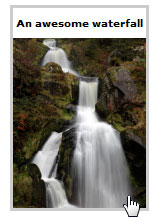
我们还可以创建一个(.offset)属性来定义居中位置。原理是使用负距拉到中间。
ul a.offset:hover:after,
ul a.offset:focus:after { top: 50%; margin-top: -15px; }
4、一点CSS3点缀:
当然,一些CSS3属性能让它更好一点。此时,我们只是用渐进增强的原则,其中CSS3-capable的浏览器将略为更好的体验。 在我们spruced CSS3后,我们的特效仍然CSS2-capable浏览器的工作,如Internet Explorer 7。
当在图像上使用hoverfocused时,在(.outline)属性框添加阴影属性以便显示一个不错的css3投影效果。
注意:目前box-shadow这个属性还不能通过CSS验证。
ul a:hover, ul a:focus
{
    display: block;
    outline: none;
    -moz-box-shadow: 3px 3px 5px #000;
    -webkit-box-shadow: 3px 3px 5px #000;
    box-shadow: 3px 3px 5px #000;
}
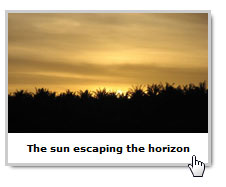
使用CSS3(rgba())属性时,我们可以略使背景透明,以便我们标题可以看到图像。 设置全彩从我们的rgba值确保浏览器,如IE8还显示背景前。
ul a:hover:after,
ul a:focus:after
{
    background: rgb(255,255,255);
    background: rgba(255,255,255,0.7);
}
Firefox 3.6, Safari 4 and Chrome 4的兼容性问题
background: -moz-linear-gradient(top, rgba(255,255,255,0.7), rgba(204,204,204,0.7)); /* Firefox 3.6+ */background: -webkit-gradient(linear, 0% 0%, 0% 100%, from(rgba(255,255,255,0.7)), to(rgba(204,204,204,0.7))); /* Safari/Chrome */为了使标题文本更突出一点,我已经一个(text-shadow)来实现阴影文本。
text-shadow: 1px 1px 1px #fff;
用(.box-sizing)这个属性来调整框模型的工作方式。
ul a.alternate01:hover:after,
ul a.alternate01:focus:after
{
    top: 0;
    width: 50%;
    height: 100%;
    line-height: normal;
    text-align: left;
    padding: 4px;
    font-size: 12px;
    -moz-box-sizing: border-box;
    -webkit-box-sizing: border-box;
    box-sizing: border-box;
}
通过调整框模型,利用这项技术可以进一步扩展标题框的大小调整我们的优势,所以我们尽可能灵活可以把这个技术使图像叠加覆盖半个,内容运行了一边。
ul a.reverse:hover:after,
ul a.reverse:focus:after { top: 0; right: 0;
解决IE显示的问题
ul li img { position: relative; z-index: -1; } /* For IE8 */ul li:not(#foo) img { position: static; } /* Reset position for better browsers *5、总结
把上面的事情综合一下。我们就得到了我们想要的代码和显示效果
html代码
Snazzy hover effects using CSS demo

CSS代码:
ul { overflow: hidden; padding: 5px; }
ul > li {
    position: relative;
    float: left;
    list-style: none;
    margin: 0 20px 20px 0;
    font-size: 10px;
}
ul a { text-decoration: none; display: block; }

ul li img { display: block; position: relative; z-index: -1; } /* IE8 fix, background colour appears behind img for uknown reason set negative z-index */ul li:not([class=na]) img { position: static; } /* Reset relative position, as this plays havoc with good browsers */
ul a:hover, ul a:focus
{
    display: block;
    outline: none;
    -moz-box-shadow: 3px 3px 5px #000;
    -webkit-box-shadow: 3px 3px 5px #000;
    box-shadow: 3px 3px 5px #000;
}
ul a:hover img, ul a:focus img { outline: 3px solid #ccc; }

ul a:hover:after,
ul a:focus:after
{
    content: attr(title);
    color: #000;
    position: absolute;
    bottom: 0;
    height: 30px;
    line-height: 30px;
    text-align: center;
    font-weight: bold;
    width: 100%;
    background: rgb(255,255,255);
    background: rgba(255,255,255,0.7);
    background: -moz-linear-gradient(top, rgba(255,255,255,0.7), rgba(204,204,204,0.7)); /* Firefox 3.6+ */    background: -webkit-gradient(linear, 0% 0%, 0% 100%, from(rgba(255,255,255,0.7)), to(rgba(204,204,204,0.7))); /* Safari */    display: block;
    text-shadow: 1px 1px 1px #fff;
}原文地址:Snazzy Hover Effects Using CSS
翻译作者:99839:利用CSS实现 hover 显示标题效果
① 如果您发现本文件已经失效不能下载,请联系站长修正!
② 如普通下载链接失效,请尝试使用迅雷,旋风等下载工具下载!
③ 部分网盘的资源,需要安装其客户端工具才能下载。
④ 本站所有下载资源收集于网络,只做学习和交流使用,版权归原作者所有。

- 提示:这篇文章发布于 2011/11/28,作者 99839,总计 4128 字.
- 原文: 非JS用CSS实现 hover 显示标题效果 | 爱壹主题